











For brokers switching CRM
Run both. Switch when the numbers agree.
GarnetSync reads the same MT5 server as your current CRM, with a manager login of its own. During the parallel run, every deposit your old CRM books shows up in reconciliation, so you can see, day by day, what each system knows.
Your accounts, from MT5
Bring the accounts across, quietly.
The trading desk lists every account on your server. The ones GarnetSync has no record of say "Not in the CRM". Add as client makes a lead from what MT5 holds, the bridge checks the login first, and nobody is emailed.
Trading desk: accounts on the server
Example- 2104742real\corvane\stdOlivia Bennett
- 2105511real\corvane\rawMarta Kowalski Lead
- 2105518real\corvane\stdNot in the CRM Add as client
Marta Kowalski added, as a lead. Nothing was emailed. She hears from you when you decide, not when the import runs.
One deposit during a parallel run
ExampleYour old CRM
Books a deposit for Olivia Bennett: 2,000.00 USD.
Your MT5 server
Balance deal #7343288 on account 2104742, "Deposit wire 2210".
GarnetSync, during the day
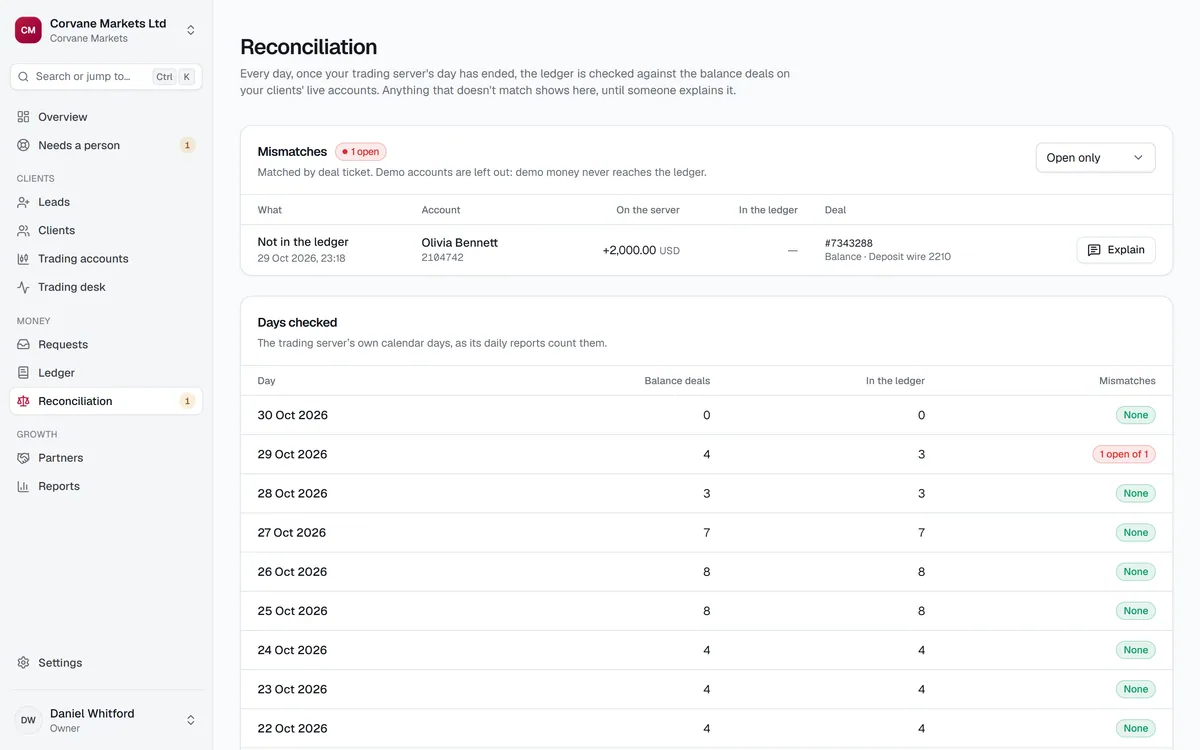
The bridge reads the deal within seconds. The ledger has no request behind it.
GarnetSync, at the close
Reconciliation for 29 Oct: not in the ledger, 2,000.00 USD, deal #7343288.
0 to explain
Explained by name
Sofia Marchetti: "Booked in the old CRM during the parallel run."
The parallel run
Both systems on, checked every day.
A deposit your old CRM books is a balance deal on MT5 that GarnetSync's ledger never approved. When the server day is reconciled, it shows up as not in the ledger, with its deal ticket, until someone explains it by name.
So the parallel run has a measure: the days that close with nothing to explain. Reconciliation waits until the bridge has re-read each day whole, and never skips one.
The switch
Five moves, none of them a leap.
Nothing switches off on a date. Each move happens when the one before it is proven.
- 1
Connect
A manager login of its own on your MT5 server, from our fixed IP, demo groups first. Your current CRM keeps its own access.
- 2
Add the accounts
Every account the CRM doesn't know shows "Not in the CRM". Add as client makes each a lead from MT5's data, and emails nobody.
- 3
Run both
Your old CRM keeps moving money. Each server day, reconciliation lists every deposit it booked that GarnetSync's ledger never approved.
- 4
Move the money
Approve deposits and withdrawals in GarnetSync instead. When days close with nothing to explain, the old CRM has stopped moving money.
- 5
Move the clients
Point your portal domain at GarnetSync with a CNAME and a TXT record, and send clients a sign-in link when you're ready.
Switching: questions
Before you switch.
Can both CRMs read the same MT5 server at once?
Yes. GarnetSync uses a manager login of its own, so it can be limited, audited and switched off without touching your current CRM's access.
Will clients notice the parallel run?
Not from us. Adding an account from MT5 emails nobody, and clients hear from your brand only when you send them a sign-in link.
Is there anything to watch when we send sign-in links?
One rule: whoever sends a client a sign-in link, or changes their email, can't approve that client's portal money for 14 days. Plan who sends the links.
Where to next
Switch on evidence, not on a date.
Reconciliation tells you when the old CRM has stopped moving money. That is the day to switch.